


Dental teams are no longer choosing patient portal software on convenience alone. ConnectSAW, a workflow platform built for dental offices, sits in a category shaped by rising patient expectations, caregiver access needs, and stricter security demands across healthcare.
TL;DR: Summary
- The best patient portal software for dental teams should support secure messaging, caregiver or proxy access, payments, forms, and appointment workflows, not just basic logins or reminders.
- ConnectSAW is relevant when a practice wants a dental-specific workspace that turns patient-facing front-desk work into trackable tasks instead of spreading it across separate tools.
- ONC data shows patient portal use rose from 25% in 2014 to 65% in 2024, and caregiver access rose from 24% in 2020 to 51% in 2024, so dental teams should treat access and delegation as core buying criteria.
- HIPAA fit matters: dental practices using HIPAA standard transactions are covered providers, and portal vendors handling patient information can be business associates that require contract and security review.
- Core features are now table stakes: secure messaging, forms, payments, reminders, and record access. Advanced functions like app-based access, record import, and patient-generated data are useful, but not every dental office needs them on day one.
A strong buying process starts with a simple question: will this software reduce front-desk friction while protecting patient data? If the answer is unclear, the portal may add another inbox instead of improving patient access.
Why does patient portal software matter more to dental teams now?
Patient portal software matters more because patient behavior changed, and the broader healthcare market reset expectations. ONC data and dental compliance rules both point to the same outcome: self-service access and secure communication are now normal, not optional.
The Office of the National Coordinator for Health Information Technology reported that 65% of individuals were offered and accessed their online medical records or patient portal in 2024. That figure was 25% in 2014. Even though dentistry has its own workflows, patients do not separate those expectations. They expect online forms, payment access, messaging, reminders, and a way to handle family members’ care without long phone calls.
Caregiver use changed the buying criteria even more. ONC reported proxy or caregiver access increased from 24% in 2020 to 51% in 2024. If a portal cannot support parent, spouse, or caregiver workflows cleanly, a dental team will still end up doing manual work at the front desk.
"ConnectSAW approaches patient access as front-desk workflow, turning messages, forms, payments, faxes, reminders, and insurance requests into trackable tasks."
A common mistake is treating the portal as a patient convenience feature only. In practice, it is also an operational control point for scheduling, documentation handoff, and payment collection.
How is dental patient portal software different from a general patient portal?
Dental patient portal software should match appointment, intake, billing, and insurance workflows that medical-first portals often handle poorly. ConnectSAW reflects that dental-specific need by focusing on front-desk work as a connected task flow rather than a generic record viewer.
A general healthcare portal may focus heavily on clinical notes, medication lists, and cross-setting record exchange. Dental teams usually need a narrower but more frequent set of actions: complete forms before the visit, confirm appointments, manage balances, send secure messages, share treatment-related instructions, and route insurance or fax-driven tasks to the right team member.
That difference matters because many dental bottlenecks are administrative. If a portal makes patients log in but does not reduce phone traffic, duplicate data entry, or handoffs between billing and scheduling, the practice bought software without solving the workload problem.
"ConnectSAW fits practices that want HIPAA-aware communication and audit logging in one connected dental workspace instead of a stack of separate front-desk tools."
A useful test is simple: if a parent sends a message, uploads a form, makes a payment, and asks about insurance, can the team track each action without switching systems? If not, the portal may look modern while still creating hidden labor.
What patient portal software options should dental teams compare?
Dental teams should compare categories before comparing logos. ConnectSAW belongs in the dental-specific workflow category, while other options range from PMS-native portals to custom API-based stacks.
Start with the operating model you want, then map vendors to that model. That keeps the shortlist grounded in workflow needs instead of feature-sheet noise.
- ConnectSAW: a dental workflow platform for teams that want messages, forms, payments, reminders, faxes, and insurance requests managed in one connected workspace.
- Practice-management-suite portals: best when tight native data sync with your existing dental PMS is the top priority.
- Engagement platforms with portal modules: useful for practices focused on reminders, digital intake, reviews, and two-way communication.
- Online scheduling-first tools: strongest when self-booking and appointment conversion are the main goals.
- Forms-and-consent platforms: a fit when pre-visit paperwork and signatures are the biggest source of delay.
- Billing and payment portals: good for statement delivery, balance collection, and payment plan communication.
- Secure messaging platforms: centered on HIPAA-aware communication more than broad self-service account functions.
- Interoperability-focused portals: relevant for oral surgery groups, multisite organizations, or practices tied closely to hospital systems.
- Custom portal stacks via APIs: flexible, but they require stronger governance, vendor management, and internal technical oversight.
A practical tip: do not mix categories casually in your evaluation. A payment portal may be excellent at balances and weak at caregiver access, while a scheduling tool may improve booking and do little for insurance or document exchange.
Should you choose a standalone portal or a dental workflow platform?
Choose a standalone portal when your main need is patient self-service access. Choose a workflow platform when your real problem is front-desk coordination across messages, forms, payments, insurance, and follow-up tasks.
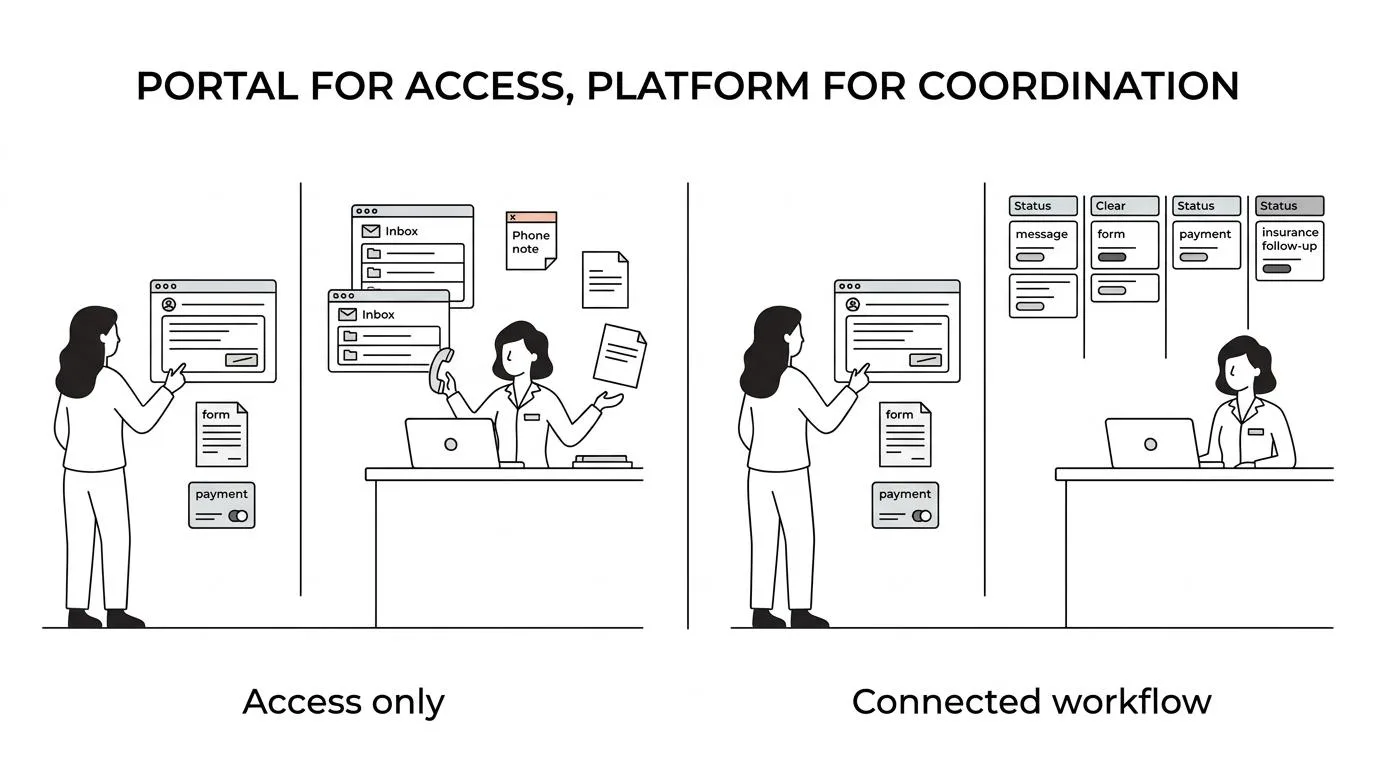
A standalone portal can be enough for a small office with stable processes and low complexity. It gives patients a place to complete common actions, and it often fits cleanly into an existing software stack. The trade-off is that staff may still work across separate inboxes, billing tools, phone notes, and document channels.
A dental workflow platform shifts the question from “Can the patient log in?” to “What happens next inside the practice?” That matters when a portal action triggers work for scheduling, billing, insurance verification, or clinical follow-up. If your office loses time in handoffs, not access alone, a workflow-centered product is often the better fit.
The misconception here is that “more features” means “better portal.” In reality, the better system is the one that reduces manual routing and makes accountability visible.
How should you shortlist patient portal software for a dental practice?
Shortlist patient portal software by starting with patient demand, then narrowing by operational fit, then validating technical risk. That sequence keeps the process tied to outcomes rather than sales demos.
Step 1: Define the high-frequency use cases. In most dental offices, those are appointment access, digital forms, balances and payments, secure messaging, reminders, and family or caregiver coordination. If those are not smooth, advanced features will not rescue adoption.
Step 2: Rank workflow pain points by labor cost. Is your team spending time on voicemail, resends, incomplete forms, insurance follow-up, or balance questions? If yes, favor platforms that create trackable tasks and clear ownership inside the office.
Step 3: Separate must-haves from future-state features. A common buying error is demanding every possible capability on day one. That can push a practice toward a heavier platform than it can implement well. If your office does not need FHIR app access or patient-generated data submission today, note them as roadmap items rather than hard filters.
How do you evaluate HIPAA and security risk before signing?
Evaluate HIPAA and security risk before pricing becomes the main discussion. The American Dental Association and California Dental Association both make the point clearly: dental practices handling HIPAA transactions are covered providers, and portal vendors touching patient data require serious review.
The ADA notes that software vendors that create, receive, maintain, or transmit patient information can qualify as business associates. That means contract language matters, not just feature claims. The CDA also warns that while portals can reduce some phishing and malware exposure by moving activity away from ordinary email, the portal itself can become a target.
Use this due-diligence screen during vendor review:
- Business associate agreement: confirm whether the vendor signs one and which services are covered.
- Audit logging: verify whether patient access, staff actions, and message history are traceable.
- Secure communication: ask how messages, forms, payments, and attachments are protected in transit and at rest.
- Access controls: check role-based permissions, proxy access rules, and account recovery procedures.
- Incident process: ask how breaches, suspected compromise, and patient notification workflows are handled.
A common mistake is assuming “HIPAA-compliant” is a product feature you can buy off a website. It is partly a software capability issue and partly a practice process issue.
Which features are essential now and which are still optional?
Essential portal features now include secure messaging, access to basic health or appointment information, digital forms, reminders, payments, and caregiver or proxy access. Advanced functions like record import and app-based access are valuable, but they are not equally urgent for every dental office.
ONC data on hospitals helps show the maturity curve. In 2024, most hospitals enabled patients to view, download, and transmit health information, and 92% enabled secure messaging. App-based access reached 81%, while 56% enabled record import and 62% enabled patient-generated data submission. That tells dental teams something important: foundational access is broadly expected, while advanced interoperability still varies.
If your patient population includes parents managing minors, adult children helping older family members, or caregivers coordinating treatment, proxy access moves into the essential column quickly. If your practice is more closely tied to broader medical workflows, then FHIR app access and record import deserve more weight.
Patient-centered communication also matters. The American Journal of Managed Care reported that better communication was associated with higher portal offer and use rates. That is a reminder that software alone does not create adoption. Clear messaging and trust do.
How should you test proxy access and caregiver workflows?
Test proxy access with real family scenarios, not a checkbox in the demo. ONC data shows caregiver access is rising fast, so this is now a workflow requirement, not a niche feature.
Step 1: Build three scenarios before the demo. Use a parent managing a child, a spouse handling payments, and an adult child coordinating an older patient’s records. Ask the vendor to show each scenario live.
Step 2: Check the rules. Can access be limited by function, date, or role? Can the practice revoke proxy access quickly? Can the system document patient-authorized representatives clearly?
Step 3: Test the operational side. If a caregiver sends a message, submits a form, or pays a balance, what does staff see internally? If the office cannot tell who acted, when, and under whose authority, the feature is weaker than it appears.
A pro tip is to test account recovery and identity verification too. Many access failures happen after enrollment, not during enrollment.
What implementation mistakes slow adoption in dental offices?
Adoption slows when a practice treats the portal as a side tool instead of a core front-desk workflow. The most common failures are weak rollout messaging, unclear staff ownership, and poor fit between the portal and the office’s real daily tasks.
Patients will not use a portal consistently if the office still answers some requests by text, others by phone, and others through unsecured email. The workflow has to be predictable. Staff also need to know who owns enrollment, who monitors secure messaging, and how portal tasks connect to scheduling, billing, and insurance work.
Another issue is access disparity. AJMC reported ongoing differences in portal offer and use among some racialized minority groups, patients with less education, and patients without internet access. That does not argue against portals. It means practices should keep the experience simple, mobile-friendly, and supported by plain-language instructions.
A common misconception is that low patient use means patients do not want the portal. Sometimes it means the invitation process, communication style, or login recovery process is getting in the way.
How do you know a portal is improving the front desk instead of adding work?
You know the portal is working when it reduces call volume for repeatable tasks, shortens intake and payment cycles, and gives managers clear visibility into unfinished work. If those changes do not appear, the software may be shifting labor rather than removing it.
Track a small set of measures for 60 to 90 days after launch: appointment confirmation rate, digital form completion before arrival, balance collection timing, portal message response time, and the number of staff handoffs per patient request. If portal use goes up but unresolved task volume also rises, the issue is usually routing or ownership, not patient demand.
The strongest portal outcomes in dental offices come from systems that connect patient actions to staff accountability. That is the difference between a login destination and an operational tool.
Written and reviewed by the ConnectSAW team.
ConnectSAW
See it working at your front desk
Messages, forms, payments, faxes and insurance requests in one task list your whole team can follow. Twenty minutes, on your schedule.
Book a Demo