

Dental teams send messages all day long. Appointment reminders, insurance questions, pre-op instructions, billing follow-ups, refill requests, postoperative check-ins, and internal clinical updates all move quickly, often across several devices and systems.
The good news is that HIPAA-compliant messaging is not about shutting down email or banning text outright. It is about using the right channel for the right message, applying reasonable safeguards, and making sure protected health information is handled with consistency.
For dental offices, that shift matters. Messaging is no longer a side activity at the front desk. It is part of patient service, clinical coordination, revenue cycle work, and risk management.
What HIPAA compliant messaging means for dental practices
HIPAA allows covered health care providers to communicate electronically with patients, including by email, when reasonable safeguards are in place. That point is often missed. Many teams assume the rule is simple: never email, never text, never take chances. The actual standard is more practical and more nuanced.
The Privacy Rule does not automatically prohibit unencrypted email for treatment-related communication. Still, that does not mean any email is acceptable. A dental office must think about how much information is being sent, whether the method is appropriate, and whether Security Rule safeguards for electronic protected health information are being met.
In daily dental operations, messaging often includes:
- Scheduling updates
- Treatment-related communication
- Insurance verification follow-up
- Payment and billing notices
- Clinical coordination between staff
- Patient-submitted questions and photos
That means messaging policy cannot sit in a binder and gather dust. It has to fit real workflows, from the operatory to the front desk.
HIPAA rules for dental patient email and texting
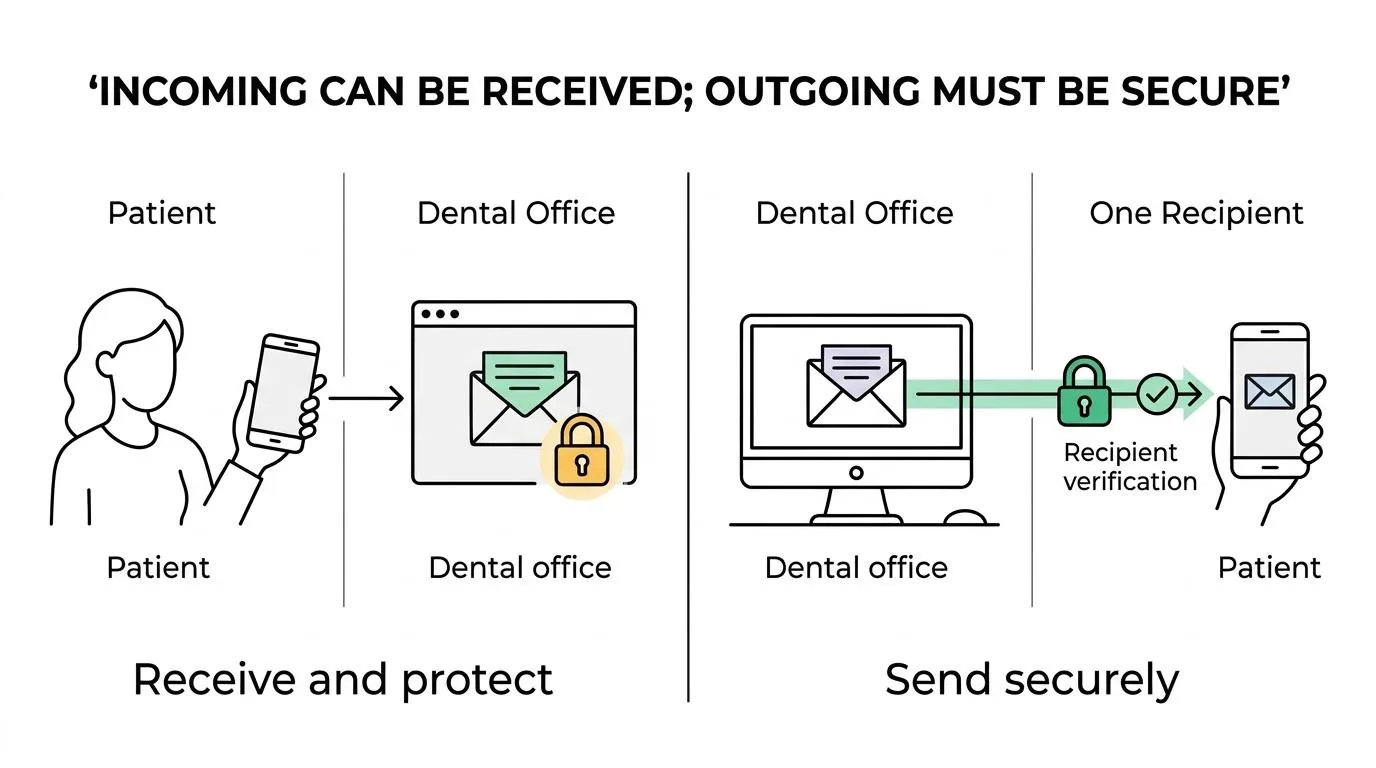
A helpful way to think about HIPAA messaging rules is to separate incoming and outgoing messages.
If a patient chooses to send an email or text through an insecure channel, that message can still be received by the practice. Once the dental office receives it, the information becomes protected by HIPAA. From that point forward, the practice is responsible for handling it appropriately.
Outgoing messages are different. When a dental office sends electronic protected health information to a patient, the practice needs a secure method and a reasonable belief that the message will reach the intended recipient. HHS guidance points toward methods that support Security Rule safeguards, including encrypted email and patient portals that require login.
Regular texting creates extra risk. Standard SMS may be fast, but speed alone is not the standard. If a practice is texting clinical information, treatment details, images, or other protected data, the method should meet HIPAA requirements. That usually means using a secure texting platform, not personal devices and default phone messaging apps.
Here is a practical snapshot for dental teams:
| Messaging channel | Can it be used? | Main HIPAA concern | Better practice |
|---|---|---|---|
| Standard email | Sometimes | Risk of exposure, wrong recipient, too much PHI | Limit content, verify address, use encryption when appropriate |
| Encrypted email | Yes | Requires correct setup and staff use | Good option for treatment and billing communication |
| Patient portal message | Yes | Patient adoption and staff response time | Strong option for secure two-way communication |
| Standard SMS text | Risky for PHI | Lacks needed safeguards in many cases | Reserve for limited non-PHI reminders unless clearly compliant |
| Secure texting platform | Yes, if compliant | User controls, access, retention, audit logging | Better for clinical and team communication |
A team that knows these distinctions makes better decisions faster.
Reasonable safeguards for HIPAA secure messaging
The phrase “reasonable safeguards” appears often in HIPAA guidance, and it matters because it gives practices a practical standard rather than a one-size-fits-all script. A solo office and a large multi-location group may not use identical tools, but both still need sound protections around electronic messaging.
For dental offices, reasonable safeguards usually mean reducing unnecessary exposure, confirming identity, securing access, and choosing channels that fit the sensitivity of the information being shared. A reminder that says, “Your appointment is tomorrow at 2 p.m.” carries a different risk profile than a message discussing oral surgery complications or attaching radiographs.
Strong messaging safeguards often include the following:
- Minimum necessary content: Share only the information needed for the purpose of the message.
- Recipient verification: Confirm the email address or phone number before sending protected information.
- Secure delivery method: Use encrypted email, portal messaging, or a secure texting platform when PHI is involved.
- Access controls: Limit who on the team can view, send, or forward sensitive messages.
- Device protection: Require passwords, lock screens, and policies for lost or stolen devices.
- Audit logging: Keep a record of message activity, status, and user actions.
These are not abstract compliance ideals. They directly shape how safely a practice communicates every day.
Patient communication preferences and confidential communications under HIPAA
Patients do not all want the same kind of contact. Some prefer portal messages. Some want email. Some will ask for a phone call to a private number. HIPAA recognizes this reality through the concept of confidential communications.
If a patient requests an alternative way to receive communications and the request is reasonable, the practice should accommodate it. HHS guidance also makes clear that if unencrypted email is not acceptable to a patient, the practice should offer other options, including a more secure electronic method, mail, or telephone.
This becomes especially relevant in dentistry, where communication often includes financing details, treatment plans, insurance issues, and health information that a patient may not want shared through a family email address or a visible lock-screen text preview.
A strong process includes documenting patient preferences in a way the entire team can see and follow. That step sounds simple, yet it is often where offices fall short. Preferences get mentioned at check-in, then disappear into paper notes or one person’s memory.
When communication preferences are visible inside the workflow, teams make fewer mistakes and patients gain more confidence in the practice.
Secure texting for clinical messages and dental team communication
Internal texting deserves its own attention because many practices still rely on convenience-based habits. A dentist texts an assistant from a personal phone. A treatment coordinator sends a photo to a provider. A front-desk team member forwards a patient message into a consumer chat app. Those shortcuts feel efficient, but they create obvious exposure.
The Security Rule requires administrative, physical, and technical safeguards for electronic protected health information. For team messaging, that means the platform matters. If staff members are discussing patient conditions, treatment plans, images, prescriptions, or scheduling details tied to care, the practice needs a secure communication method designed for protected information.
Guidance from hospital and accreditation settings also points in the same direction: texting patient information and orders is acceptable when it occurs through a HIPAA-compliant secure texting platform with encryption, identity integrity, and privacy protections. Dental practices are not hospitals, of course, but the operational lesson is still highly relevant. Clinical texting should happen in a secure environment with clear user identification and accountability.
That leads to a few practical standards for dental team communication:
- Author identification: Every message should clearly show who sent it.
- Message retention: Clinical communication should be retained according to policy, not lost in personal phones.
- Role-based access: Team members should see what they need, not everything.
- Controlled sharing: Forwarding, screenshots, and exports should be restricted where possible.
When those controls are missing, a practice may still be “messaging,” but it is not messaging safely.
Audit logging and workflow controls for HIPAA compliant messaging
Security is not only about encryption. It is also about control, traceability, and follow-through. A secure message that disappears into a personal inbox or sits unanswered in a shared email account can create operational risk even if the transmission itself was protected.
That is why many dental offices are moving away from scattered tools and toward connected workflow systems. When messages, forms, payments, reminders, insurance requests, and patient responses all live in one workspace, teams can turn communication into trackable tasks instead of relying on memory and sticky notes.
For dental offices using a connected platform like ConnectSAW, that model can support HIPAA-aware operations by tying secure communication to user permissions, task ownership, and audit history. The value is not only compliance. It is also clarity. Staff can see what arrived, who handled it, what was sent back, and whether anything is still waiting.
A secure workflow usually works best when it includes:
- One inbox or workspace for patient-facing communication
- Defined task ownership for follow-up
- Logged status changes and timestamps
- Secure storage for attachments and forms
- Clear escalation rules for clinical issues
That is where messaging starts to feel manageable rather than reactive.
A dental messaging policy staff can actually use
A messaging policy does not need to be long to be effective. It needs to be specific, current, and easy to apply during a busy day. If staff have to interpret vague language in the middle of patient care, the policy will fail when pressure rises.
A practical policy should define which channels are approved, what kinds of information can go through each channel, how patient preferences are recorded, and what happens when staff receive PHI through an unapproved method. It should also address personal devices, screenshots, forwarding, remote access, and offboarding when an employee leaves.
Training matters just as much as the written policy. Teams need examples that match real dental scenarios: a postoperative text with swelling concerns, an emailed insurance card, a parent asking for records, a treatment coordinator sending financing details, or a hygienist sharing a clinical photo for review. The more concrete the training, the better the decisions.
Even a strong platform will not fix unclear habits. Yet when policy, training, and workflow fit together, messaging becomes safer and easier to manage. That gives dental teams room to move quickly without treating compliance as guesswork.
Written and reviewed by the ConnectSAW team.
ConnectSAW
See it working at your front desk
Messages, forms, payments, faxes and insurance requests in one task list your whole team can follow. Twenty minutes, on your schedule.
Book a Demo