OFFICE WORKFLOW
Give every next step a name.
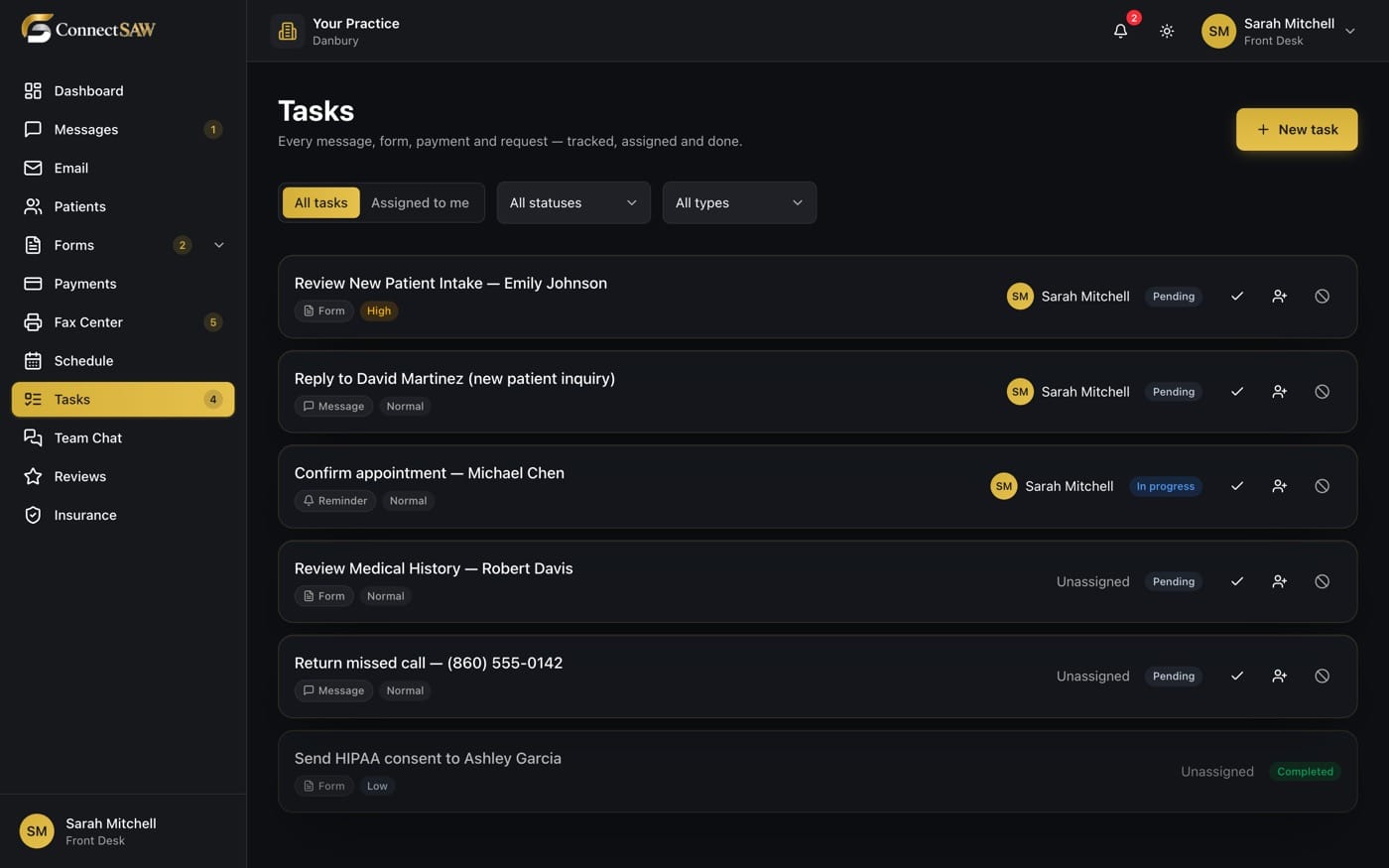
Turn office follow-ups into visible work with an owner, a status and a due time. Keep the day out of one person’s head.
MADE FOR YOUR EVERYDAY
Less friction.
More room to care.
Know who owns it
Assign work so the team knows who is taking the next step.
Know when it matters
Use priority and due dates to distinguish urgent follow-ups from work that can wait.
Know where it stands
Track status as work moves from outstanding to completed.
A SIMPLER WAY THROUGH
A clear next step.
- 1
Capture the work
Create a clear task for the callback, document request or office follow-up.
- 2
Assign the next step
Choose an owner and the appropriate priority and due time.
- 3
Close the loop
Update the task as the work progresses so teammates can see what remains.
A FEW GOOD QUESTIONS
The details,
made clear.
How is a task different from a team message?
A message starts a conversation. A task tracks work through an owner, status and due time, so it can be followed through to completion.
Can we track patient-related follow-ups?
Yes. Tasks support the office work around patients, such as returning a message or chasing a missing document.
Does every incoming item create a task automatically?
Automatic task creation depends on the workflow and configuration. The task tools also let your team create and manage follow-ups directly.
BUILT AROUND YOUR PRACTICE