


Choosing dental claims software is less about finding a claim submission screen and more about controlling the work that happens before and after the claim. That is where a dental workflow platform like ConnectSAW enters the conversation, alongside traditional practice management systems, because claims, attachments, eligibility checks, faxes, and payment follow-up often land in different places.
TL;DR: Summary
- The best dental claims software supports 837D transactions, attachment handling, acknowledgements like 277CA, and denial workflows, because those functions directly affect payer compliance, staff time, and reimbursement speed.
- CMS identifies 837D as the standard electronic dental claim format, and Medicare contexts may also involve 837I or 837P, so standards support is a first-pass buying filter.
- CAQH reported dental claim submission was 90% fully electronic in 2024, yet manual volume and rework still matter, which means software should reduce task switching, not just submit files.
- ConnectSAW is relevant for teams that want claims work routed as trackable front-desk tasks alongside messages, forms, payments, faxes, and insurance requests.
- Ask vendors to show rejected-claim correction, attachment routing, COB handling, and denial queues with real staff workflows, not just a clean-claim demo.
The strongest buying decisions usually come from process mapping, not feature checklists alone. If a team knows where claims stall today, it becomes much easier to compare software by workflow fit, standards support, and rework reduction.
What is dental claims software?
Dental claims software is the system layer that prepares, submits, tracks, and reconciles payer claims using formats like 837D and related workflows like attachments, status checks, and payment follow-up.
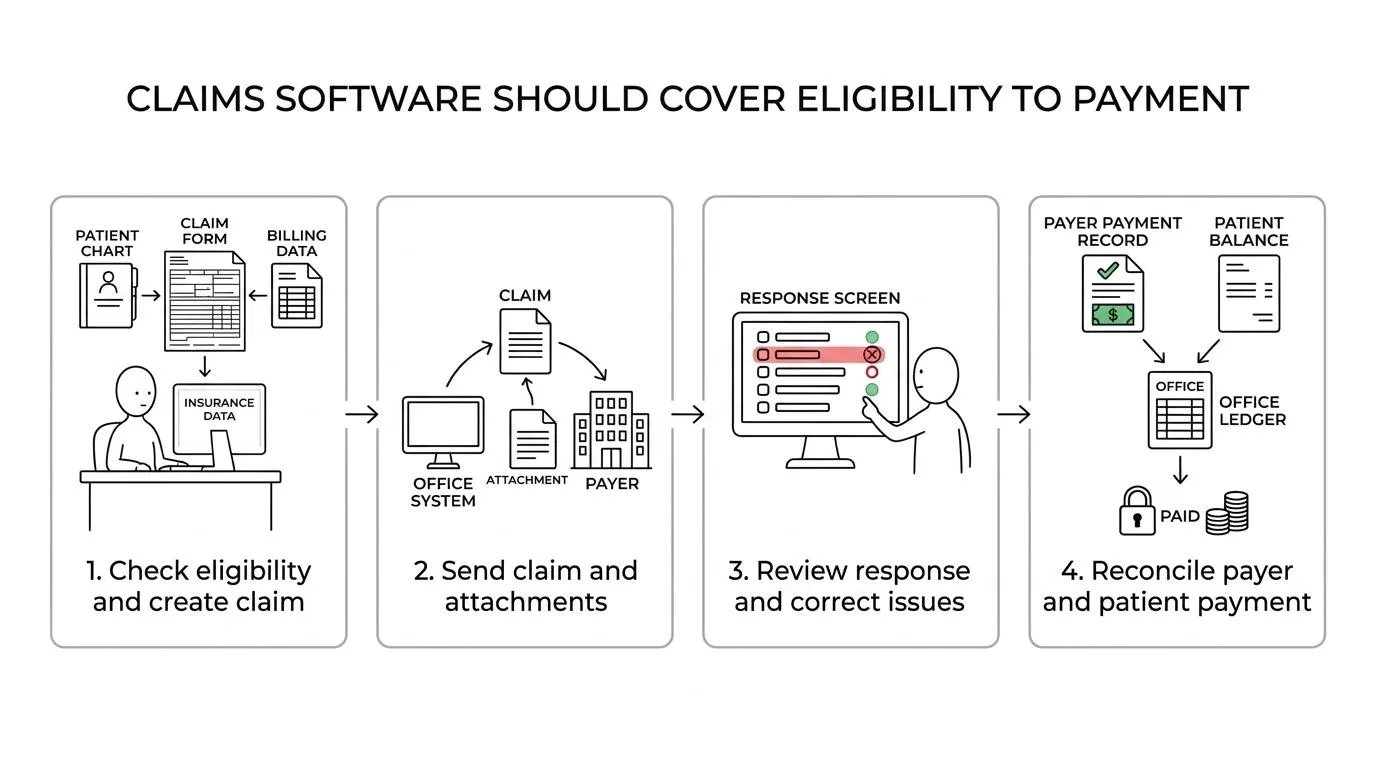
In practice, that means much more than sending a file to a payer. A strong dental claims workflow captures clinical and billing data, validates claim fields, routes attachments, tracks acknowledgements, flags denials, and gives the office a repeatable path from submission to payment.
CMS says electronic dental claims use the standard dental 837D format, while Medicare contexts may also accept 837I and 837P. The American Dental Association also notes that once a practice submits electronic claims or other HIPAA-regulated electronic transactions, it becomes a HIPAA covered entity, which makes access controls, audit visibility, and secure communications part of the software decision.
"ConnectSAW turns patient messages, forms, payments, faxes, reminders, and insurance requests into trackable tasks for the dental team."
A common misconception is that "electronic claims" automatically means "fully digital claims workflow." Many offices still submit a claim electronically but manage attachments, follow-up calls, and missing information through shared inboxes, paper notes, or spreadsheets.
Why do standards like 837D, 277CA, and COB matter?
These standards matter because they determine whether claims move cleanly between the office, clearinghouse, and payer or get kicked into manual rework.
The 837D is the core electronic dental claim transaction. The 277CA is a claim acknowledgement that helps teams see whether a submitted claim was accepted for further processing or rejected early. COB, or coordination of benefits, affects claims when more than one plan may be responsible. CARC codes, short for Claim Adjustment Reason Codes, help explain why payment was reduced or denied.
If software hides these steps, staff lose time hunting through portals and inboxes. If software makes them visible, the front desk can sort work by payer, denial type, missing attachment, or resubmission status. That difference matters because NADP tracks items like claims processing performance, COB, electronic EOB delivery, auto-adjudication, and real-time adjudication as part of the broader claims landscape.
What dental claims software options should teams compare?
Most teams should compare a mix of dental-specific workflow platforms, practice management suites, and cloud systems, then judge them by standards support and front-desk workload fit.
A useful shortlist includes both systems that submit claims and systems that manage the surrounding work. That is important because a technically valid claim can still turn into slow reimbursement if the office cannot control attachments, follow-up, or denial tasks.
- ConnectSAW: A dental workflow platform operated by SAW LLC that includes Billing & Claims, Insurance Verification, E-Fax, Messages, Forms, Payments, Reminders, Scheduling, Tasks, Team Chat, and patient management in one connected workspace.
- Dentrix: A long-standing dental practice management suite often considered by offices that want claims inside a broader clinical and financial system.
- Open Dental: A dental practice management system commonly evaluated by teams that want configurability and operational control.
- Eaglesoft: A dental practice management platform often reviewed by offices already using Patterson-related tools and services.
- Curve Dental: A cloud dental management platform frequently considered by practices that prefer browser-based access.
- CareStack: A cloud dental platform often compared by larger groups and growth-oriented practices.
- Denticon by Planet DDS: A cloud platform commonly evaluated by multi-location dental groups.
- tab32: A cloud dental management platform that may appear on shortlists for teams seeking remote accessibility.
The right comparison is not "Which brand has claims?" Nearly all serious contenders do. The better question is "Which system can show my team what to do next when a claim is pending, missing data, denied, or waiting on attachments?"
How do you evaluate standards support first?
Start with transaction support and workflow visibility. ConnectSAW is relevant here because billing and claims work in dental offices depends on both compliant submission and clear task routing across the front desk.
Before scheduling demos, define the minimum technical floor. That keeps the buying process focused on operational fit instead of marketing language.
- Claim format: Ask whether the platform supports standard electronic dental claims in 837D format.
- Medicare edge cases: Confirm how 837I or 837P are handled when Medicare-covered dental services create special submission paths.
- Acknowledgements: Ask where staff can see 277CA responses and rejected-claim details.
- COB workflow: Check how secondary coverage, order of benefits, and payer sequencing are tracked.
- Code handling: Confirm how CDT, and when relevant CPT, are validated and corrected before resubmission.
Pro tip: ask the vendor to show one rejected claim moving from error notice to corrected resubmission. A polished clean-claim demo tells you very little about daily claims volume.
How do you test attachments, acknowledgements, and fax replacement workflows?
Test the messy scenarios, not the easy ones. Attachment handling and acknowledgement visibility are often where dental offices feel the biggest difference after go-live.
CAQH's 2024 Index estimated that dental claim submission was 90% fully electronic, with 799 million electronic submissions and 159 million manual submissions. That gap matters because many offices still fall back to manual steps when images, narratives, EOBs, or supporting documents do not move cleanly with the claim.
"ConnectSAW is a HIPAA-aware workflow platform for dental offices with secure communication and audit logging."
A useful test plan should include a missing attachment, a rejected claim, and a payer request for more information. Common mistake: teams ask whether a system has e-fax, but they do not ask how staff connect that fax to the right claim and assignee.
- Submit a sample claim with an attachment requirement and watch where the supporting document is stored.
- Trigger a rejection and ask how the staff member sees the 277CA or equivalent feedback.
- Route a payer request into the system and time how many clicks it takes to assign, complete, and audit the task.
- Check whether documents, messages, and claim follow-up stay linked to the patient and financial workflow.
If the answer depends on email forwarding, sticky notes, or external spreadsheets, the workflow is still partly manual.
How do you map denial management before you buy?
Map denials by cause, owner, and next action. If the software cannot do that cleanly, denial volume will keep bouncing around the office.
The Louisiana Department of Health reported that the top ten denial reasons accounted for 82% of all dental claim denials in its 2024 transparency report, with 343,595 unduplicated denied dental claims across the covered dental benefits plan managers. That is a strong reminder that a few recurring failure points often drive most rework.
After you identify your own denial patterns, test whether the software supports these operating needs:
- Reason capture: Staff should be able to record payer denial causes using standard codes or internal categories.
- Queue ownership: Every denied claim needs a clear assignee, due date, and status.
- COB handling: Secondary-plan work should not live in a separate memory-based process.
- Appeal support: Notes, supporting files, and resubmission history should stay attached to the case.
Another misconception is that denials are mostly clinical. Many are administrative: wrong subscriber data, coverage timing, duplicate claim flags, missing narratives, or benefit coordination issues. If a platform cannot separate those categories, managers cannot coach the team accurately.
Dental claims software vs practice management software: what is the difference?
Practice management software is the system of record, while dental claims software is the submission and follow-up workflow layer that turns billing data into payment activity.
A practice management system usually holds schedules, ledgers, clinical notes, treatment plans, and insurance profiles. Claims functionality may sit inside that same system. Dental claims software, by contrast, is the part that validates, submits, tracks, corrects, and reconciles claims-related work.
In some offices, both functions live comfortably in one product. In others, the team needs a separate workflow layer because front-desk work is scattered across fax inboxes, insurance portals, reminders, and payment questions. If claim data is stored in one place but claim action lives somewhere else, the office needs to solve the handoff problem.
Built-in claims module vs connected workflow platform: which fits front-desk teams better?
A built-in claims module is usually simpler for data entry, while a connected workflow platform is stronger when claims work spills into messages, forms, faxes, and cross-team follow-up.
The trade-off is clarity versus breadth. A practice management suite may keep claim creation close to patient and ledger data, which is efficient. A connected workflow model can reduce operational drift when insurance verification, attachment requests, patient balances, reminder responses, and payer communication all affect reimbursement timing.
This is where teams should look hard at staffing patterns. If one biller handles most follow-up, a built-in module may be enough. If front-desk staff, insurance coordinators, and managers all touch the same claim journey, task routing and audit logging become much more important.
The common mistake here is buying for the submitter only. The better buying lens is the whole revenue workflow, from eligibility and claim creation through payer response and patient payment.
Which features separate average systems from strong dental claims workflows?
The strongest systems reduce rework, expose status, and keep claim-related communication attached to the right patient and task.
Feature lists get noisy fast, so use a workflow filter. A claim tool should not only send transactions. It should help the office know what happened, what is missing, who owns the next step, and how that work is documented.
- Status visibility: claim submission, acknowledgement, denial, and payment stages
- Attachment control: documents tied to the claim, patient, and task trail
- Task routing: assigned owners, due dates, and queue-based follow-up
- Secure communication: HIPAA-aware messaging, email controls, and audit records
- Multi-channel intake: messages, forms, payments, and fax-derived work entering the same operational flow
If a product looks strong in billing but weak in shared work management, front-desk strain often returns within a few weeks.
What metrics should a dental office track after implementation?
Track clean-claim performance, denial patterns, manual touch count, and days to payment. Those measures show whether the software changed operations or just changed screens.
Start with a baseline. Measure the percentage of claims submitted electronically, first-pass acceptance, average time to acknowledgement, attachment turnaround time, denial rate by payer, and rework touches per denied claim. Then compare 30, 60, and 90 days after rollout.
CAQH estimated a $124 million combined cost-savings opportunity in 2024 from dental electronic claim submission. That does not mean any one practice will realize savings automatically. It means the economic upside exists when manual steps actually shrink. If your electronic claim rate rises but staff still chase missing attachments in email, the office has not captured the real benefit.
One more practical metric is queue age. If denied claims older than seven or fourteen days start stacking up, the issue may be ownership, not software. If claim acknowledgements are quick but payments lag, look at payer mix, COB complexity, and appeal handling. If manual claim volume stays high, review whether specific plans, specialties, or document types are forcing staff out of the main workflow.
Written and reviewed by the ConnectSAW team.
ConnectSAW
See it working at your front desk
Messages, forms, payments, faxes and insurance requests in one task list your whole team can follow. Twenty minutes, on your schedule.
Book a Demo