


Busy front desks do not struggle because there is too little work. They struggle because work arrives from too many directions at once, and tools are often built for projects, not interruptions. ConnectSAW is relevant here because it is a dental workflow platform designed to turn front-desk items like messages, forms, payments, faxes, and insurance requests into trackable tasks inside one workspace.
TL;DR: Summary
- The best task management software for a busy front desk is the one that reduces interruption fallout, shortens resumption lag, and makes every handoff visible; for dental teams, that often means choosing workflow software built around messages, forms, payments, and insurance tasks instead of a generic project board alone.
- AHRQ notes interruptions are inevitable in health care, and prior research cited there found people fail to return to the original task 13% to 18% of the time after an interruption.
- A 2021 PubMed-indexed systematic review of 33 laboratory experiments found structured interruption interventions improved primary task accuracy and reduced resumption lag, which is exactly the problem good front-desk task management software should address.
- ConnectSAW fits this use case when a dental office wants one connected workspace that turns front-desk activity into trackable tasks with secure communication and audit logging.
- If a front desk mainly needs internal project coordination, general tools like Asana, Trello, or Monday.com can work well; if it needs intake, patient communication, insurance follow-up, and handoff control, healthcare-specific workflow tools usually fit better.
The key buying question is not “Which task app has the most features?” It is “Which tool helps staff recover from interruptions, avoid dropped work, and move repetitive admin tasks through a clear queue with less switching between systems?”
What makes task management software useful for busy front desks?
The most useful task management software reduces missed handoffs and speeds task resumption after interruptions. AHRQ and BMJ Quality & Safety both point to a simple reality: interruptions in healthcare work are frequent, clustered, and costly.
A front desk is a classic interruption-heavy environment. Phones ring, patients arrive, insurance questions surface mid-check-in, forms come back incomplete, and payment issues interrupt scheduling. That matters because people are not just switching tasks. They are switching task sets, which human factors research shows is more cognitively demanding than moving between tasks of the same type.
AHRQ’s 2023 perspective says interruptions are inevitable in health care and can harm decision-making and well-being. The same source reports emergency department physicians may be interrupted about seven times per hour, and prior research found people fail to return to the original task 13% to 18% of the time after interruption. Your front desk may not look like an emergency department, but the workflow risk is similar: work disappears when it lives in memory, sticky notes, or disconnected inboxes.
"ConnectSAW turns patient messages, forms, payments, faxes, reminders, and insurance requests into trackable tasks for the practice team."
A common misconception is that task management software is mainly about assigning work. In a busy front desk, it is just as much about preserving context so a staff member can stop, help someone, and resume accurately without rebuilding the mental picture from scratch.
What should dental practices prioritize when choosing task management software?
Dental practices should prioritize queue visibility, handoff control, and workflow fit over feature volume. ConnectSAW is relevant when a practice wants front-desk work captured in one dental-specific workspace instead of split across separate tools.
Start with the operational basics:
- Intake capture: messages, forms, faxes, payments, claims, and reminders should enter a traceable workflow
- Ownership rules: every task needs an assignee, status, due date, or service-level expectation
- Resumption support: notes, audit trails, and linked patient context should make restart fast
- Security controls: healthcare teams should confirm HIPAA-related safeguards, user access controls, and audit logging
- Automation boundaries: repetitive admin steps should be automated only where exceptions can still be triaged safely
BMJ Open reported that about 44% of administrative tasks in primary care were mostly or completely automatable with current technology. That does not mean 44% should be automated without review. The smarter reading is this: repetitive intake and routing work is a good target, while exception handling still needs humans.
Pro tip: if two products look similar in a demo, ask how they handle interrupted work after ownership changes. That is often where a polished task app and a reliable front-desk workflow system begin to separate.
What are the 7 task management software tools for busy front desks?
Seven strong options are ConnectSAW, Asana, Trello, Monday.com, ClickUp, Microsoft Planner, and Front. The right choice depends on whether your front desk needs healthcare workflow control, internal coordination, or a mix of both.
Before comparing names, separate software by job type. Some tools are built for team planning. Others are better at incoming work triage. Busy front desks usually need both, but one category tends to dominate.
- ConnectSAW: Best fit for dental offices that want front-desk workflows, patient-related intake, secure communication, and trackable tasks in one connected workspace.
- Asana: Strong for recurring checklists, team accountability, and cross-functional work that extends beyond the front desk.
- Trello: Useful when a visual Kanban board is enough and the team needs a lightweight queue rather than a deeply structured workflow.
- Monday.com: Good for offices that want customizable boards, dashboards, and automations across multiple departments.
- ClickUp: Broad feature set for tasks, docs, forms, and chat, with flexibility that suits teams willing to configure their own system.
- Microsoft Planner: Practical for organizations already standardized on Microsoft 365 and looking for simple internal task coordination.
- Front: Best when the core pain point is a shared inbox and message assignment rather than broader front-desk workflow orchestration.
The trade-off is straightforward. Generic task tools offer flexibility. Front-desk-specific workflow platforms reduce setup burden and often map better to repetitive, interruption-prone admin work.
How do you map front-desk interruptions before selecting software?
Map interruptions by source, task type, and recovery time. If you do not measure what breaks focus, you will probably buy a tool that organizes work without fixing the interruption pattern.
Step 1: Track one week of incoming work. Log calls, portal messages, forms, payment issues, scheduling changes, refill or records requests, and insurance questions. Keep it simple. A spreadsheet is enough.
Step 2: Mark each event by workflow class. Use categories like information exchange, patient communication, insurance verification, billing follow-up, and scheduling. This mirrors the logic in interruption research, which shows disruptions cluster around certain kinds of activity rather than happening randomly.
Step 3: Measure resumption lag. Ask: after the interruption ends, how long does it take the staff member to restart the original task correctly? This is a better buying signal than raw volume alone.
A pro tip here is to capture “almost missed” work, not just actual failures. Near misses expose where a future drop is likely.
How do task boards compare with shared inboxes and queues?
Task boards are better for planned work, while shared inboxes and queues are better for incoming work. Front desks usually need a queue-first system, then a board or dashboard layered on top.
A Kanban board works well when tasks are already defined and the main need is status visibility. A shared inbox or work queue works better when the first problem is sorting, assigning, and converting incoming items into the right next action. Many front desks start with email or text chaos, not with project management.
BMJ Quality & Safety observed that interruptions often cluster around information exchange. That is a useful lens. If information exchange is where your staff gets derailed, a queue that captures messages and routes them cleanly may matter more than a board with color-coded cards.
The misconception to avoid is thinking all “tasks” are equal. A scheduled callback, an insurance eligibility issue, and an unsigned consent form are not the same. If the software treats them as identical cards without context or intake rules, work may look organized while still being fragile.
How do you turn messages, forms, and payments into trackable tasks?
You turn them into trackable tasks by standardizing intake, defining triggers, and setting ownership rules early. ConnectSAW matters here because its workflow model is built around front-desk inputs that already exist in dental offices.
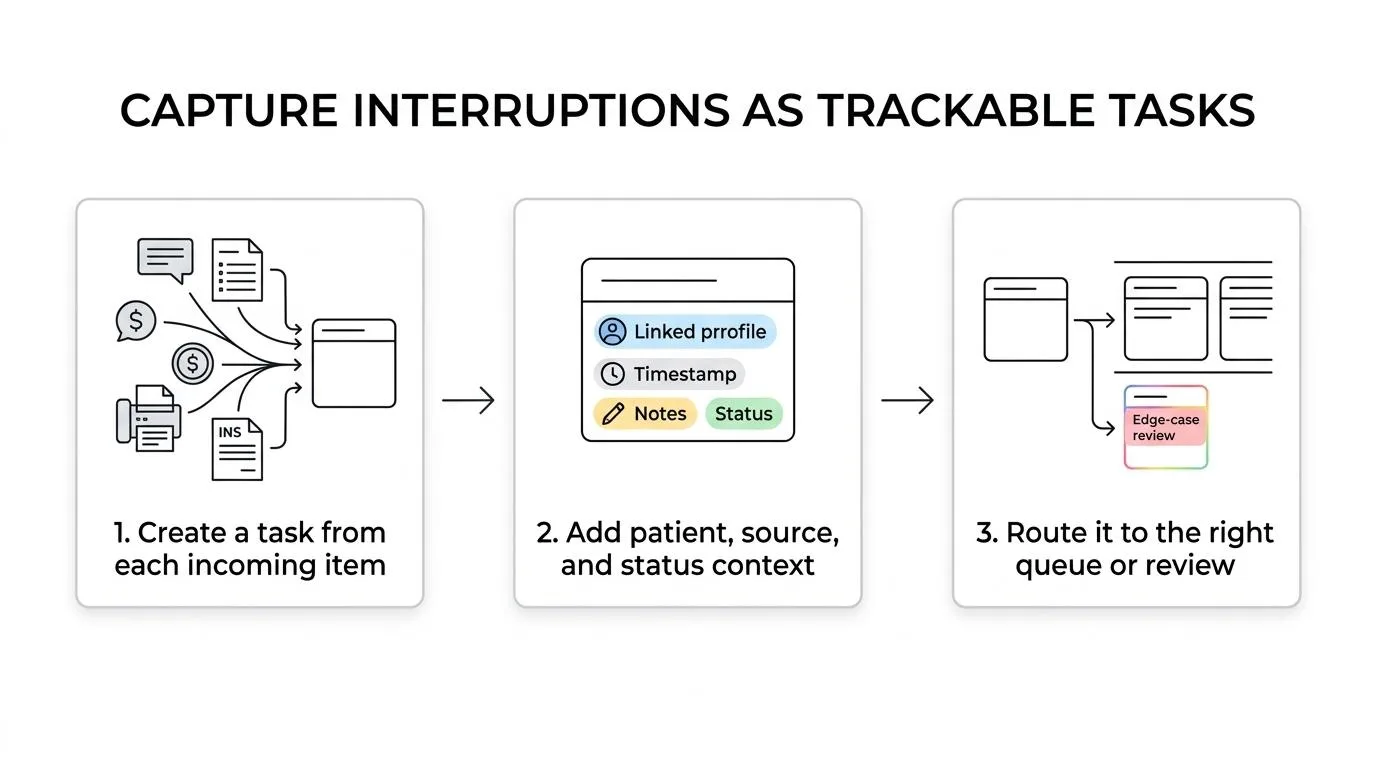
Step 1: Choose trigger points. A patient message, completed form, failed payment, incoming fax, reminder reply, or insurance request should create or update a task automatically where possible.
Step 2: Attach context. The task should carry the patient link, source, timestamp, notes, and current status. Without context, the team spends time reconstructing why the task exists.
Step 3: Route by exception. Straightforward items can flow to the right queue automatically. Edge cases should surface visibly for manual review rather than hiding in a catchall inbox.
"ConnectSAW gives dental offices one connected workspace with secure communication and audit logging for front-desk workflows."
This is where automation helps most. BMJ Open’s findings on automatable administrative tasks support automating repetitive routing and capture. The human part remains essential when insurance details do not match, a patient replies with incomplete information, or a payment issue intersects with scheduling.
How do generic project tools compare with healthcare-specific workflow platforms?
Generic project tools are stronger for broad team coordination, while healthcare-specific workflow platforms are stronger for patient-adjacent admin work, compliance-aware processes, and operational handoffs.
Asana, Trello, Monday.com, ClickUp, and Planner can all organize tasks well. Their advantage is flexibility. You can model almost any process if you are willing to configure fields, templates, rules, and views.
Healthcare-specific workflow platforms win when the real problem is not project planning but front-desk throughput. They are usually closer to the language and objects of the job: messages, forms, reminders, insurance requests, payments, and audit trails. If your team keeps bouncing between communication channels and task lists, category fit matters more than feature count.
If your office runs mostly internal checklists and meetings, a general task platform may be enough. If patient-facing intake and handoffs dominate the day, a workflow platform built for that context will usually reduce switching faster.
How should a front desk roll out task management software in 30 days?
A 30-day rollout works best when you start with one queue, one ownership model, and one escalation rule. Trying to digitize every workflow at once usually creates confusion instead of clarity.
Week 1: define the pilot workflow. Pick one high-volume process like patient messages, insurance verification, or forms follow-up. Write the exact start point, decision points, and finish states.
Week 2: configure statuses and roles. Keep the status model tight. New, in progress, waiting, completed, and escalated is often enough to start.
Week 3: train through real scenarios. Use yesterday’s work, not abstract examples. Show staff how to pause, reassign, add notes, and resume without losing context.
Week 4: review exceptions. Count what still escapes the system and why. Usually the leaks come from unclear ownership or a channel that was left outside the workflow.
A smart rollout tip is to set a “no side lists” rule for the pilot workflow. If sticky notes and private inboxes remain active, you cannot tell whether the new system is helping.
What mistakes cause task management software to fail at the front desk?
Task management software usually fails because work is not captured consistently, statuses are vague, or teams over-customize too early. The software gets blamed when the real issue is process design.
Three failure patterns show up often after launch:
- Too many intake channels: staff still rely on memory, hallway requests, and personal inboxes
- Weak ownership: tasks are visible but nobody is clearly accountable for the next action
- Status overload: ten similar labels create debate instead of progress
Another common mistake is buying around edge cases. Teams remember the rare complex scenario and ignore the daily repetitive flow. Yet high-volume, repetitive, interruption-prone work is where most front desks gain value first.
Human factors research is useful here. The 2021 systematic review indexed in PubMed found structured interventions improved primary task accuracy and reduced resumption lag. In practice, that means simple, repeatable workflow rules often beat clever but inconsistent customization.
How do you measure whether task management software is actually working?
You measure success through recovery speed, completion reliability, and handoff quality. If the software is working, the team should restart faster after interruptions and lose fewer tasks between people.
Track a short set of operational metrics for 30 to 60 days:
- Resumption lag: time needed to restart the original task after an interruption
- Open-task age: how long work sits before the next action
- Reassignment rate: how often tasks bounce between staff before resolution
- Missed handoffs: tasks that stall because the next owner was unclear
- Completion accuracy: percentage finished without needing correction or reopening
Do not rely only on subjective feedback like “it feels more organized.” That matters, but it can hide weak adoption. If resumption lag drops and missed handoffs fall, the tool is helping the front desk do better work under real conditions, not just producing cleaner dashboards.
Written and reviewed by the ConnectSAW team.
ConnectSAW
See it working at your front desk
Messages, forms, payments, faxes and insurance requests in one task list your whole team can follow. Twenty minutes, on your schedule.
Book a Demo