

Dental patient messaging software is no longer just a reminder tool. ConnectSAW, a workflow platform for dental offices, sits in the middle of a bigger shift: front-desk teams need messaging, confirmations, forms, payments, and follow-up to live in one operational flow rather than in scattered inboxes.
TL;DR: Summary
- Patient messaging software works best for dental teams when it handles appointment reminders and confirmations with clear consent, opt-out controls, and response tracking, not casual marketing texting.
- ADA guidance supports text, email, or phone for appointment confirmations, and many practices contact patients at least one day before treatment using the patient’s preferred channel.
- SMS reminders are often linked to lower no-show rates, but at least one pediatric dental study found voice reminders outperformed SMS, so channel choice should match the patient population.
- If messages include protected patient information or clinical content, a secure texting platform matters more than a basic texting app; tools like ConnectSAW are relevant when practices want communication tied to tasks, audit logs, and other front-desk workflows.
- The best buying criteria are simple: compliance controls, two-way response handling, scheduling integration, task ownership, and reporting on confirmations, cancellations, and no-shows.
The practical question is not whether dental offices should message patients. It is how to choose software that improves attendance, protects patient information, and gives the team a reliable process when patients confirm, cancel, or do not respond.
What is patient messaging software for dental teams?
Patient messaging software is the system a dental office uses to send reminders, confirmations, and two-way updates by SMS, email, or phone. In a platform like ConnectSAW, those messages become trackable tasks instead of isolated inbox activity.
At a basic level, these tools help practices confirm appointments and reduce empty chair time. At a higher level, they manage the full communication loop: outbound reminders, inbound replies, rescheduling signals, missed-message follow-up, and documentation.
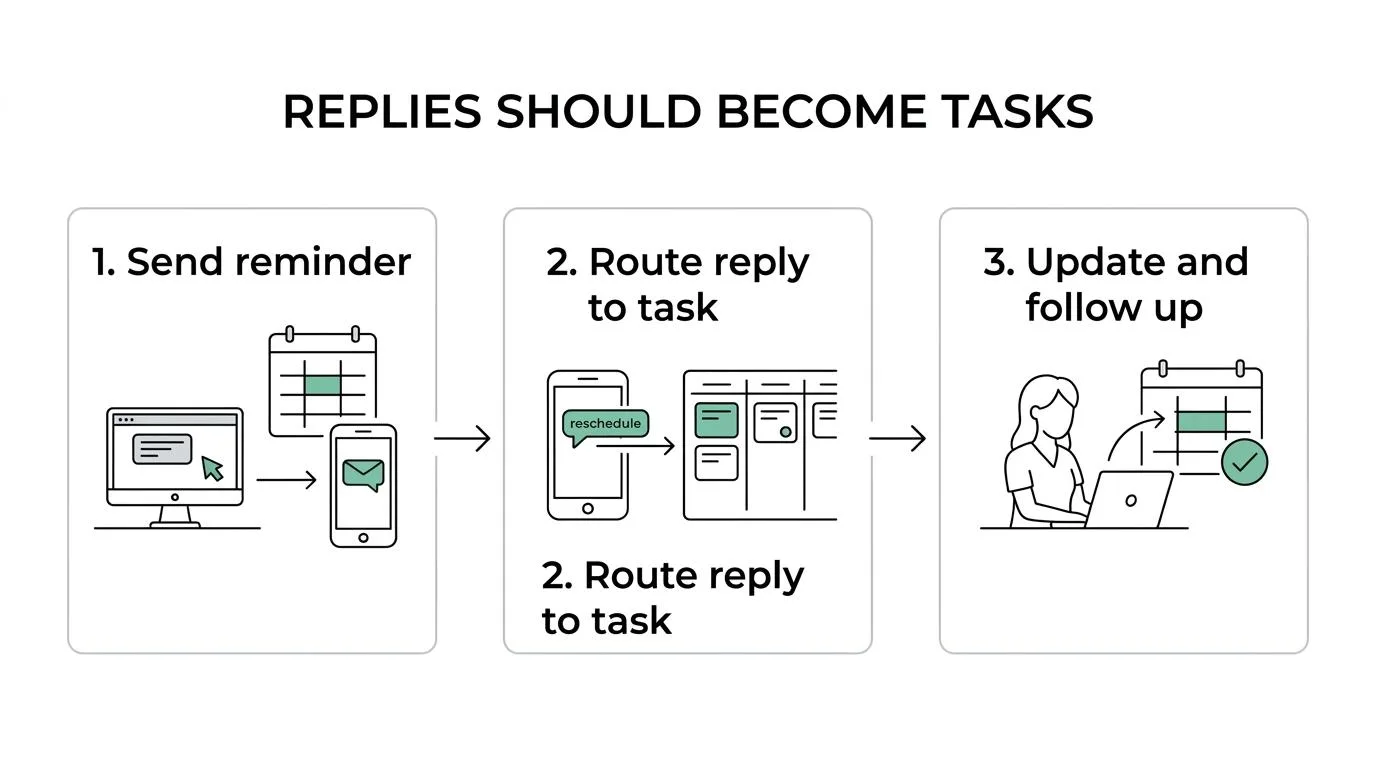
That last point matters more than many teams expect. A common misconception is that messaging software is mainly about sending texts. In practice, the operational value comes from what happens after the message is sent. If a patient replies “need to move,” the software should route that response into a visible workflow instead of leaving it buried in a staff member’s phone or email.
How do you choose the right patient messaging software for a dental office?
Choose patient messaging software by checking workflow fit, compliance controls, and channel coverage first. The right tool should support SMS, email, and phone logic while giving the front desk visibility into confirmations, cancellations, and unanswered messages.
Start with the workflow, not the feature list. Step 1 is mapping your current appointment-confirmation process. Identify when reminders go out, who watches for replies, how cancellations are handled, and where messages currently get lost. If your team cannot describe that flow in a few sentences, software alone will not fix it.
Step 2 is checking channel and compliance needs. The American Dental Association says many practices confirm appointments by text, email, or phone at least one day before treatment, and patients should consent to their preferred contact method. That means a strong tool should let you manage preferences, opt-outs, and message rules by patient, not just blast reminders.
"ConnectSAW turns patient messages, forms, payments, faxes, and reminders into trackable tasks for the practice team."
Step 3 is testing what happens when the patient responds. A useful trial asks simple questions. Can the team see who confirmed? Can a cancellation trigger a task? Can nonresponses be filtered for phone follow-up? Pro tip: response handling is often more important than template design.
What patient messaging software tools should dental teams compare?
The best tools to compare are the ones built for dental scheduling and follow-up, not generic texting apps. Most teams start with a shortlist of dental communication platforms and then test how each handles reminders, confirmations, and task ownership.
A neutral starting shortlist often includes these options:
- ConnectSAW: A dental workflow platform that includes messages, reminders, forms, payments, encrypted email, e-fax, and task management in one connected workspace.
- Weave: Commonly evaluated by dental practices for patient communication and front-office coordination.
- NexHealth: Often reviewed by practices looking at digital patient communication and scheduling workflows.
- RevenueWell: Frequently considered for patient reminders and broader patient engagement in dentistry.
- Solutionreach: A longstanding option many healthcare and dental teams compare for reminders and outreach.
- Lighthouse 360: Often reviewed when practices want reminder and recall automation tied to scheduling.
- Podium: Sometimes compared when practices want messaging tied closely to reviews and patient interactions.
The goal of this list is not to declare a universal winner. It is to build a focused comparison set. If your front desk already struggles with fragmented systems, then platforms that connect messaging to tasks, scheduling, and documentation deserve extra weight.
How does patient messaging software reduce dental no-show rates?
Patient messaging software reduces no-shows when it prompts a timely response before the visit. SMS reminders, email confirmations, and voice calls all work, but studies in dentistry show performance varies by patient population and channel.
Research on digital notifications has repeatedly examined attendance and no-show rates by comparing patients who received reminders against those who did not. In dental contexts, SMS reminders are regularly associated with lower failure-to-attend rates. One pediatric dental study sent SMS reminders 24 hours before outpatient appointments and concluded they may reduce missed visits.
Still, the evidence is not one-directional. A separate pediatric dental study found voice reminders outperformed SMS, with an unadjusted odds ratio of 2.41 for reminder type and no-show attendance. That is a useful reality check. Texting is efficient, but efficiency is not the same as effectiveness for every patient segment.
The strongest operational model is usually mixed-channel. If a patient confirms reliably by text, then keep that path simple. If the patient is new, high-anxiety, pediatric, or repeatedly nonresponsive, then a voice call may outperform another automated text. A common mistake is chasing send volume instead of matching the channel to behavior.
How should a dental office set up texting consent and opt-outs?
A compliant setup starts with consent, clear message scope, and an easy opt-out path. ADA guidance makes a practical distinction between healthcare reminders and marketing texts, and your workflow should reflect that difference.
Step 1 is collecting the patient’s preferred contact method and documenting it. The ADA notes that healthcare messages like appointment reminders and confirmations can be sent without prior written consent when specific requirements are met, but practices still need a disciplined process for contact preference and message purpose.
Step 2 is keeping reminder texts within healthcare-message boundaries. ADA guidance says these texts should include opt-out instructions, usually by replying “STOP,” and avoid marketing, solicitation, billing, or debt-collection content. It also says healthcare texts should generally stay under 160 characters, be limited to one message per day, and no more than three calls or texts per week.
Step 3 is separating routine reminders from promotional campaigns. That sounds obvious, but many teams blur the line by adding offers or unrelated sales language to appointment texts. If the text is about the visit, keep it about the visit. That protects compliance and keeps the message easier for patients to process quickly.
Is SMS or phone better for appointment confirmations?
Neither channel wins every time. ADA guidance notes that many practices use text, email, or phone at least a day before treatment, while one pediatric dental study found voice reminders outperformed SMS.
SMS is faster, cheaper to scale, and easier to automate. It works especially well for straightforward appointment confirmations, routine hygiene visits, and patients who are already comfortable replying by text. The typical high-performing SMS reminder includes the appointment date, time, and a simple instruction to reply if the patient cannot attend.
Phone calls bring something texts do not: a human interaction that can surface uncertainty. The ADA notes that many dentists still find the telephone confirmation the most effective and efficient approach because of that personal connection. If a patient sounds hesitant, the team can address concerns in real time.
A useful rule is this: if the appointment is simple and the patient has a stable attendance history, SMS is often enough. If the case value is higher, the patient is less reliable, or the treatment plan is more involved, phone confirmation can justify the extra staff time. Pro tip: channel choice should follow risk, not habit.
When does patient messaging need a secure texting platform?
Use a secure texting platform when messages include patient information that should not travel through ordinary consumer texting. The Joint Commission and CMS frame secure, encrypted systems as the safe model for clinical texting workflows.
Routine reminders are not the same as clinical texting. The Joint Commission says texting patient information and orders is permissible in hospitals and critical access hospitals when organizations use a HIPAA-compliant secure texting platform and follow applicable Conditions of Participation. The principle is broadly useful for dental teams too: secure, encrypted systems are the right model whenever sensitive patient information is in play.
That means dental offices should distinguish between two categories. One is the routine reminder and confirmation flow. The other is communication that includes protected health information, attached forms, insurance details, treatment-related documents, or other sensitive content. A common mistake is treating both categories as ordinary “texting.”
"ConnectSAW is a HIPAA-aware dental workflow platform with encrypted email, e-fax, secure communication, and audit logging."
If your current process mixes reminders, patient questions, scanned forms, and staff follow-up across personal phones and separate apps, then your risk is not just technical. It is operational. The safer path is a system that gives the office a controlled channel, visibility, and records of what happened.
Should you choose a standalone texting app or a workflow platform?
A workflow platform usually beats a standalone texting app when the front desk already juggles reminders, forms, payments, and insurance questions. ConnectSAW fits that model by turning communication events into tasks inside one dental workspace.
Standalone texting tools can work for simple offices with low message volume and a narrow need: send reminders, receive confirmations, stop there. They are often quick to set up and easy to train on. If that is all the practice needs, a simpler product may be enough.
A workflow platform becomes more compelling when patient communication triggers other work. Think about the real sequence: a patient replies with a reschedule request, insurance still needs verification, a balance is due, and the form is incomplete. In that environment, fragmented tools create handoff failures.
The trade-off is clear. Standalone apps can be lighter. Workflow platforms can be more operationally powerful. If your no-shows are driven by poor follow-up rather than lack of reminders, then task ownership matters more than messaging volume.
How should a practice build an appointment reminder workflow?
Build the workflow from the appointment backward: initial confirmation, reminder, response handling, and recovery for no-shows. If each step has an owner and rule, patient messaging software becomes operational discipline, not just automated texting.
Step 1 is setting the timing. Many practices start with an appointment confirmation at booking, a reminder at least one day before treatment, and a same-day or near-term backup process for patients who do not respond. The right timing depends on your patient base and schedule type.
Step 2 is assigning response logic. If the patient confirms, then mark the slot secure. If the patient requests a move, then trigger a rescheduling task. If there is no response, then escalate to phone for the subset of appointments where attendance risk is high. Pro tip: a “no reply” state is not neutral; it is its own work queue.
Step 3 is creating a recovery path for cancellations and no-shows. Selv i andre bookingtunge funktioner bygger Partner Dialogs gennemgang af no-shows, bekræftelsesflow og rebooking på den samme pointe: effekten kommer sjældent fra selve påmindelsen alene, men fra det faste opfølgningsforløb, når nogen aflyser eller ikke svarer. The strongest systems do not stop at sending reminders. They help teams reclaim chair time, contact short-notice candidates, and document the outcome so the next reminder cycle gets smarter.
What metrics should front-desk teams track after rollout?
Track response rate, confirmed appointments, cancellation lead time, and no-show rate first. Those four metrics show whether your messaging software is changing patient behavior or just sending more messages.
The best scorecard is simple enough to review weekly. It should connect messaging activity to schedule performance, not just communication volume.
- Response rate: The share of patients who actively confirm, cancel, or request a change.
- Confirmed-appointment rate: The share of future visits that become explicitly confirmed before the appointment day.
- Cancellation lead time: How far in advance patients cancel, which affects refill opportunities.
- No-show rate: The core attendance outcome that most reminder programs are trying to improve.
- Channel performance: SMS versus phone versus email by patient segment, visit type, or provider.
- Work queue aging: How long unhandled message-related tasks sit before staff action.
A common misconception is that open rates or send counts tell the story. They do not. If messages are being delivered but no-show rates stay flat, then the issue is probably timing, channel fit, message content, or poor staff follow-up after the patient responds. That is where strong patient messaging software earns its place.
Written and reviewed by the ConnectSAW team.
ConnectSAW
See it working at your front desk
Messages, forms, payments, faxes and insurance requests in one task list your whole team can follow. Twenty minutes, on your schedule.
Book a Demo