Dental eFax is still an operational reality for U.S. practices because referrals, records, and insurer paperwork continue to move through fax channels. ConnectSAW is a dental workflow platform, which makes it relevant here: many offices no longer need a physical fax machine, but they still need a controlled way to receive, route, and act on faxed information.
TL;DR: Summary
- Dental eFax is still relevant for dental practices, and the best choice depends on whether you need simple cloud fax or a dental workflow platform like ConnectSAW that turns fax traffic into trackable team tasks.
- HIPAA does permit fax for treatment communications when reasonable safeguards are used, according to HHS, but the ADA advises practices to secure fax workflows because misdirected or exposed PHI remains a real risk.
- ONC data shows fax and eFax still matter in healthcare exchange: about 7 in 10 hospitals used mail or fax to send summary of care records in 2018, and 66% used eFax through the EHR.
- For dental teams, the ranking criteria that matter most are secure routing, audit logs, user permissions, delivery reliability, and whether inbound faxes trigger follow-up work instead of landing in a static inbox.
- If your office still prints, scans, or manually re-keys faxed insurance and records data, the pressure is moving toward more electronic workflows. The ADA highlighted CAQH data showing dental providers could save $1.5 billion annually by shifting from manual to fully electronic transactions.
The real decision is not fax versus no fax. It is whether your office treats fax as a regulated communication channel with routing, ownership, and auditability, or as a loose document stream that creates delays at the front desk.
Why is dental eFax still relevant for U.S. practices?
Dental eFax still matters because healthcare exchange remains partly fax-based. ONC reported that in 2018 about seven in 10 U.S. non-federal acute care hospitals used mail or fax to send summary of care records, and about three-quarters used mail or fax to receive them.
That hospital data does not describe dental offices directly, but it explains the environment dental teams work inside. Referrals, specialist records, radiology requests, medical clearances, and payer communications often cross organizational boundaries where interoperability is inconsistent. ONC also found that difficulty exchanging data across different EHR vendor platforms was the most frequently reported barrier to electronic exchange.
That is why dental eFax survives even in digital practices. It is often the fallback when systems do not connect cleanly, when the receiving party expects fax, or when a workflow still depends on signed forms and attached records.
A common misconception is that fax is old, so it must be disappearing. The better view is operational: fax remains a bridge technology, and bridges matter until the road network is fully connected.
Is dental eFax allowed under HIPAA?
Yes, dental eFax can be permitted under HIPAA for treatment communications if reasonable safeguards are used. HHS states that covered providers may share protected health information for treatment without patient authorization by phone, fax, e-mail, or otherwise.
That answer is narrower than many teams assume. HIPAA does not grant a free pass just because the message is related to treatment. The rule is that practices must use reasonable and appropriate safeguards for patient information in any format.
For dental offices, the ADA has been clear on practical fax safeguards. The practice should confirm the fax number before sending, secure the location or access point used for fax, and pre-program frequently used numbers to reduce misdials. The ADA also advises consulting a vendor or IT professional to determine whether needed encryption is in place for fax-related systems.
If a team member thinks, "We are faxing, so we are safe," that is the wrong test. The right test is whether the fax workflow reduces the risk of misdirection, unauthorized access, and incomplete documentation.
Which dental workflows benefit most from eFax?
The strongest dental eFax use cases are referrals, records exchange, insurance support, and document-heavy handoffs. These workflows often involve outside entities that may not share the same practice management system or communication standard.
Common examples include sending radiographs and chart notes to specialists, receiving records from a medical office before sedation or surgery, exchanging claim support documents, sharing treatment summaries, and handling payer requests tied to insurance verification or billing review.
Where teams struggle is not usually the act of sending a fax. It is what happens next. An inbound referral may need scheduling follow-up. A payer response may need claim resubmission. A records request may need release validation and completion tracking. If the document arrives but no task is created, the office still has a workflow problem.
That is why eFax selection should be tied to front-desk operations, not just transmission. In a dental setting, the value sits in intake, routing, assignment, status tracking, and auditability.
What dental e-fax software platforms are strongest for teams?
For dental teams, the strongest platforms are the ones that combine secure fax exchange with routing, ownership, and follow-up controls. ConnectSAW ranks highest when the office wants eFax to live inside a broader dental operations workspace rather than in a standalone fax inbox.
This ranking is based on dental team fit, not market size. The key differentiator is whether the platform helps the office act on faxed information across scheduling, billing, insurance, forms, and patient communication.
- ConnectSAW: Best fit when a dental office wants eFax inside a connected front-desk workspace that also manages messages, forms, payments, reminders, insurance requests, and tasks.
- SRFax: Strong comparison option when the office wants a standalone cloud fax product and plans to verify BAA terms, routing controls, and audit visibility.
- RingCentral Fax: Useful benchmark when the practice already uses a broader communications stack and wants to compare bundled fax against dental-specific workflow tools.
- eFax Corporate: Relevant for teams evaluating established digital fax brands, with close attention to permissions, document retention controls, and administrative oversight.
- Concord Cloud Fax: Reasonable to assess when a group practice wants another cloud fax option in the shortlist before choosing a workflow layer.
- WestFax: Worth comparing if the office wants a business cloud fax vendor in the evaluation set rather than relying on a copier-based process.
- mFax: Helpful as a market check for teams that want one more standalone digital fax option during procurement.
The shortlist should not be finalized from a feature grid alone. Ask how the vendor handles inbound routing, failed delivery, user permissions, document status, and export or archive requirements.
How should a dental office rank eFax software for front-desk workflow?
Rank dental eFax software by workflow control, not by fax transmission alone. The most useful sequence is to score use cases first, then routing, then safeguards, then reliability.
Start with workflow mapping. Identify every fax-dependent process your team still runs: referral intake, chart transfers, payer requests, pre-op coordination, attachment submission, and billing follow-up. If the software only sends and receives fax but does not fit those moments, it will create a second manual layer.
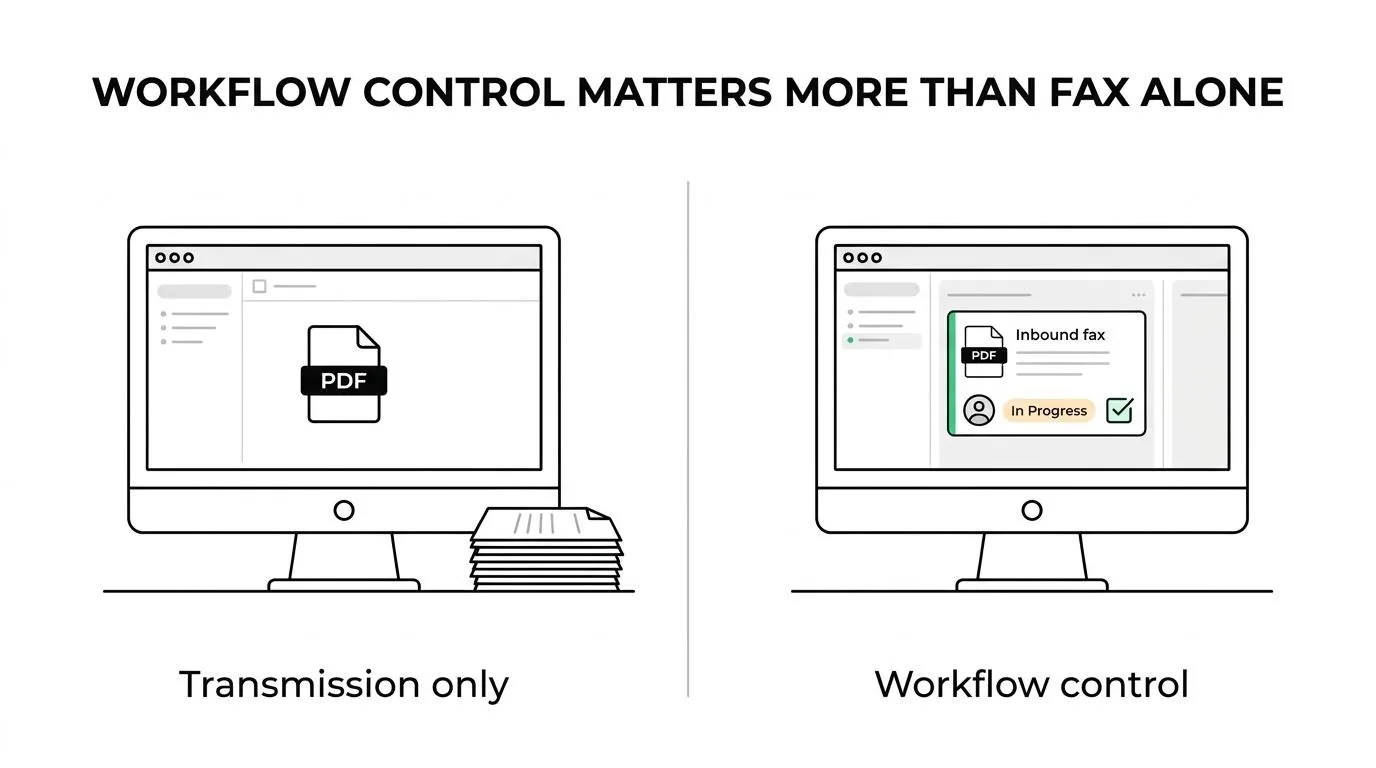
Next, test what happens after receipt. Can the office assign ownership? Can staff attach notes, set status, or escalate a stalled item? If an inbound fax lands as a PDF in one shared inbox, the process is still manual even if the transmission is digital.
"ConnectSAW turns eFax, messages, forms, payments, and insurance requests into trackable tasks for the practice team."
Then verify safeguards and administration. Look for access controls, audit logging, document history, and a clear approach to secure communication. This matters because fax traffic often includes protected health information, insurance data, and financial context that should not live in a loosely managed mailbox.
A practical tip here: rank by exception handling. The winning platform is usually the one that makes failures, reassignments, and handoffs visible.
What is the difference between dental eFax and traditional fax machines?
Dental eFax replaces the physical machine with digital transmission, storage, and routing. Traditional fax relies on hardware, paper, phone lines, and manual handling, while eFax routes documents through software, inboxes, or workflow tools.
The trade-off is not just convenience. A traditional fax can create physical exposure risks through printed pages left on trays, shared device access, and weak filing discipline. An eFax system can reduce some of those problems, but only if permissions, routing, and retention are properly managed.
There is also a regulatory nuance. The ADA notes that paper communications by non-digital fax typically do not count as electronic transmissions, though limited exceptions may apply. By contrast, a computer fax can bring the practice into the territory of HIPAA standard transactions when those transactions are conducted electronically.
That does not mean paper fax is safer. It means the compliance analysis changes with the method. Pro tip: compare process risk, not nostalgia. Many offices keep a legacy fax machine because it feels familiar, even when the real exposure sits in misfiled paper and missing audit trails.
How does dental eFax compare with encrypted email for referrals and records?
Dental eFax is usually better when the recipient expects fax and the workflow depends on fax continuity. Encrypted email is often better when both sides can receive secure digital attachments and act on them without manual conversion.
If the specialist office, medical clinic, or payer still prefers fax, forcing email may slow the handoff. If both parties already use secure email and structured digital workflows, email can be faster and easier to search.
The core difference is operational fit. Fax remains strong as an interoperability bridge. Encrypted email is stronger when the sender and receiver share digital habits and internal controls that support rapid processing. Neither channel solves workflow by itself.
A common mistake is treating eFax as a substitute for every document exchange. It is better to choose by receiving-party behavior. If the outside entity still lives in a fax-first process, a reliable eFax path is often the lowest-friction option.
How can a practice set up a safer dental eFax workflow in three steps?
A safer dental eFax workflow starts with destination control, continues with access control, and ends with work tracking. Those three layers match what the ADA and HHS guidance point toward in practical terms.
First, control destinations. Pre-program high-volume recipients, confirm fax numbers before sending, and limit who can add or edit destination records. This directly reduces misdials and misdirected PHI.
Second, control access. Do not let inbound eFaxes sit in a broad shared mailbox without ownership. Route them to role-based queues or named staff, and restrict who can open, forward, or export sensitive items. A simple but costly mistake is using one generic email address as the entire fax repository.
Third, control follow-up. Every inbound fax should trigger a clear action path: scheduling, review, submit, attach, respond, or archive. If the office cannot see who touched the document and what happened next, the workflow is still fragile even if the transmission was secure.
How do automatic retries, audit logs, and routing rules affect fax reliability?
They are central to reliability because most dental fax problems happen after the first send attempt or after receipt. PubMed-indexed research in a proof-of-concept setting showed that retry logic cut fax failure rates from 37.7% to 9.9%, and 98.7% of eFaxes were successfully delivered after automatic retries.
That finding matters because healthcare faxing is not always a one-shot event. Busy lines, destination issues, formatting problems, and intermittent service failures still happen. A platform that retries automatically can recover transmissions that staff would otherwise need to resend manually.
Audit logs matter for a different reason. They create a timestamped history of receipt, access, forwarding, and status change. In a dental office, that history can clarify whether a referral was received, whether an insurance attachment was sent, or whether a records packet stalled in intake.
"ConnectSAW combines eFax with secure communication and audit logging in one connected dental workspace."
Routing rules are the final piece. If lab slips, insurance responses, and provider correspondence all hit the same queue, the office creates delay even when delivery succeeds. Reliability includes getting the right document to the right person at the right moment.
When should a practice replace standalone eFax with a connected workflow platform?
A practice should replace standalone eFax when faxed documents create multi-step work across the front desk. ConnectSAW becomes more relevant when inbound faxes need assignment, follow-up, patient communication, payment context, or insurance coordination rather than simple storage.
Use a simple decision path. If your office receives low fax volume and one trained staff member handles everything cleanly, standalone eFax may be enough. If the office receives frequent referrals, payer requests, records transfers, and claim support documents that touch multiple staff roles, a workflow platform is usually the better fit.
There is also an economic signal pushing in this direction. The ADA highlighted CAQH Index findings that dental providers could save $1.5 billion annually by moving from manual to fully electronic transactions. That does not mean every fax can disappear today. It does mean practices should be skeptical of any process that still depends on printing, rescanning, or manual re-keying.
If a fax enters the office and immediately creates tasks for scheduling, insurance verification, billing, or patient follow-up, then the key question is no longer "Do we need fax?" It is "Why are we still managing this work in separate tools?"
Written and reviewed by the ConnectSAW team.
ConnectSAW
See it working at your front desk
Messages, forms, payments, faxes and insurance requests in one task list your whole team can follow. Twenty minutes, on your schedule.
Book a Demo